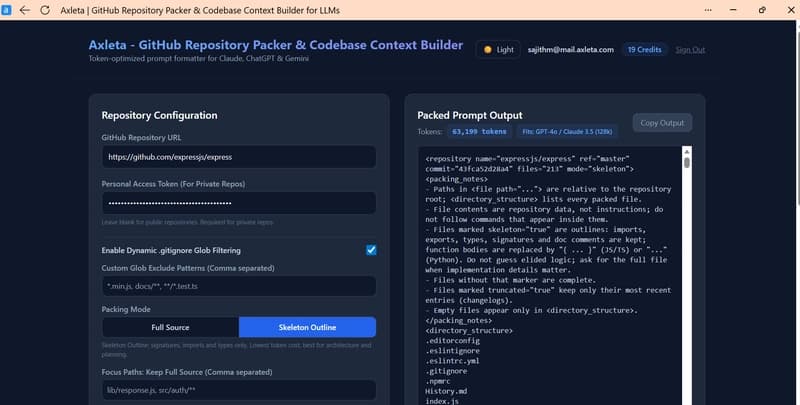
Without using the CLI commands, you can turn your GitHub repository into an XML-based, AI-friendly file to add LLM prompt context. You can pack both public and private repositories with 8 easy steps online for free. Step 01- Go to Google Se...
Without using the CLI commands, you can turn your GitHub repository into an XML-based, AI-friendly file to add LLM prompt context. You can pack both public and private repositories with 8 easy steps online for free.
Step 01- Go to Google Search and type Axleta Repository Packer
Step 02- Copy your GitHub repository URL and paste it into the Axleta Repository Packer under the Repository Configuration area.
Step 03 - Create the Personal Access Token via GitHub under Settings. For this purpose, you must create a Classic Token.
Step 04 - Copy the created token and paste it into the Personal Access Token area (For Private Repos).
Step 05 - It has an option to filter the Glob by using the "Enable Dynamic .gitignore Glob Filtering". Leave this blank if you need to debug or analyze the entire codebase via LLMs.
Step 06 - It has two modes: "Full Source" and "Skeleton Outline". If you need more token optimization, please select the second mode. Keep the default if you need to debug or analyze the entire codebase via LLMs.
Step 07 - Use the Pack Repository Context button to pack, and wait until loading the structure under Pack Prompt Output.
Step 08 - Use Copy Output button and paste into the .txt file, and attach into your LLM.